AULAY 9010 Paper Tray Officejet Pro 717012309952
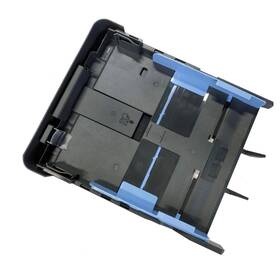
( Brand: Aulay ), ( Part Type: Paper Tray ), ( Color: Paper Input Tray Grey ), ( Size: Paper Input Tray ), ( UPC: 717012309952 ), ( Package Dimensions Lxwxh: 13.98x10.24x2.05 Inches ), ( Weight: 1.08 Pounds )
Review AULAY Paper Delivery Tray Output Input Compatible Hp Officejet Pro
The Aulay Paper Tray for the HP OfficeJet Pro 9010 is an authentic and reliable replacement accessory designed specifically for use with this popular HP printer model. This paper tray is engineered to provide optimal feeding and handling of standard A4-sized paper, ensuring high-quality output and uninterrupted print jobs.
Measuring 12.99 inches long, 11.1 inches wide, and 3 inches high, this paper tray is perfectly sized to accommodate the dimensions of the OfficeJet Pro 9010 printer. Its sleek design blends seamlessly with the overall look of the printer and enhances the aesthetic appeal of your workspace while providing essential functionality.
Constructed using durable and sturdy materials, the tray is built to last and support heavy paper loads efficiently. The tray efficiently separates and feeds one sheet of paper at a time from its stack, which can accommodate up to 250 sheets of plain or photo paper. This generous capacity minimizes the need for frequent reloading, thereby streamlining the printing process and saving you valuable time.
This paper tray offers convenient paper feeding in both manual and automatic modes. The manual mode allows for single-sheet feeding for specialty papers or smaller projects, while the automatic mode efficiently handles larger jobs by feeding papers continuously from the tray. Additionally, this tray supports both face-up and face-down feeding positions for further versatility during usage.
The Aulay Paper Tray for the HP OfficeJet Pro 9010 features an easy-to-load paper design, making it simple and straightforward to install and maintain. The side-mounted lever enables hassle-free access to the tray, while the secure installation ensures minimal paper jams and misfeeds, Resulting in more reliable printing results.
By choosing the Aulay Paper Tray for your HP OfficeJet Pro 9010, you are investing in a high-quality, durable, and cost-effective replacement part that upholds the integrity and performance you've come to expect from your HP printer. Don't let paper jams or low tray capacities compromise your print experience - upgrade to this reliable and efficient paper tray solution today to elevate your printing tasks.
Pros and Cons of buying a HP OfficeJet Pro 9010 A3 All-in-One Printer with Paper Tray (Model: AULAY 717012309952)
I. IntroductionThe HP OfficeJet Pro 9010 is a renowned A3 all-in-one printer known for its versatility, productivity, and high-quality output. This model comes with an advanced paper handling system, including Paper Tray AULAY 717012309952. In this article, we will discuss both the pros and cons of investing in this printer and paper tray combo to help you make a well-informed purchasing decision.
II. Pros of HP OfficeJet Pro 9010 and Paper Tray (AULAY 717012309952)1. High Production Speed: The OfficeJet Pro 9010 printer boasts an impressive print speed, producing up to 30 pages per minute (ppm) in black and white and 18 ppm in color. Having a fast printer allows businesses and individuals to process large print jobs more efficiently.
2. A3 Size Capability: The printer and paper tray support A3 paper size, enabling users to create large-format documents, posters, and presentations at home or in the office.
3. Versatile Connectivity: With multiple connectivity options, such as Wi-Fi, Ethernet, USB, and Bluetooth, users can print from various devices, including smartphones, tablets, laptops, and even cloud sources like Google Drive and Dropbox.
4. High-Quality Output: The printer delivers excellent print quality, with sharp text, vibrant colors, and clear images, making it suitable for both personal and professional use.
5. Automatic Document Feeder (ADF): The dual-tray ADF on the HP OfficeJet Pro 9010 can accommodate up to 250 pages, enablingUsers to print multiple documents back-to-back, which can save time and reduce paper handling.
6. Wireless Direct Printing: Users can print documents wirelessly directly from their mobile devices with no need for a network or Wi-Fi connection, providing excellent convenience.
III. Cons of HP OfficeJet Pro 9010 and Paper Tray (AULAY 717012309952)1. Toner Cost: The HP OfficeJet Pro 9010 uses PageWide XL ink cartridges, and while it offers generous page yields (up to 3,300 pages for black and up to 2,200 pages for color), the initial cost of these cartridges is relatively high compared to other models.
2. Large Footprint: The sizeable build of the OfficeJet Pro 9010 might be a concern for users with limited desk space. Measuring at 16.8 x 20 x 13.6 inches (HxWxD) and weighing around 46.8 pounds, it may require substantial room in the workspace.
3. Slow Color Printing: Although the officejet pro 9010 is fast in black and white, color printing can be relatively slow, taking around 54 seconds per page for a draft quality print and 1 minute and 31 seconds per page for a maximum print quality print.
IV. ConclusionThe HP OfficeJet Pro 9010 all-in-one printer with paper tray AULAY 717012309952 provides numerous benefits, including its high-speed printing, A3 capability, versatile connectivity options, and high-quality output. However, it does have some drawbacks, including its relatively high initial cost for ink cartridges and its large footprint.
If these cons are not major concerns for your office or personal needs, then the OfficeJet Pro 9010 can serve as an excellent investment for a high-performing A3 all-in-one printer offering numerous benefits such as easy-to-use features and versatile connectivity.
V. RecommendationIf the cons, such as high initial ink costs and larger footprint, are major concerns, potential buyers might explore other suitable A3 all-in-one printer alternatives with lower ink costs or smaller footprints. The HP OfficeJet Pro X, Epson WorkForce Pro WF-Pro WF-Pro WF-7710, or Canon imageCLASS MF733Cdw, among others, may be worth considering depending on the user's specific needs and requirements.
Details:
Product name Paper Delivery Tray Input Tray, Compatible with HP Office Compatible Officejet Pro 9010 9012 9013 9014 9015 9016 9018 9019jet 9019.
specifications feedertray:
- brand: Aulay
- part type: Paper Tray
- color: Paper Input Tray Grey
- size: Paper Input Tray
- upc: 717012309952
- package dimensions lxwxh: 13.98x10.24x2.05 Inches
- weight: 1.08 Pounds
payments feedertray:
- credit card: Diners-club
- other
- wallet: Google-pay
returns feedertray:
- time: 30 Days
- policy: Returns Accepted
- method: Money back
- paid by: Seller
general feedertray:
- Printers, Scanners Supplies > Printer Scanner Parts Accs > Feeders Trays
- condition: New
seller feedertray:
- rating: 100.0%
- # reviews: 91
- city: Eugene, Oregon
shipping feedertray:
- transit: 4-10 Days
- cost: $0.00
- service: Standard
- class: Standard
- type: Fixed
offer feedertray:
- started: January 28, 2025
- options: Ship-to-home
- quantity: 1
- availability: In Stock
- sold: 0
