BROTHER 8553678 Page Paper Cassette Tray MFC-9560CDW 250
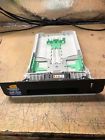
( Brand: Brother ), ( Manufacturer Part Number: 8553678 ), ( Type: 250 Page Paper Cassette Tray ), ( Compatible Brand: For Brother ), ( Compatible Series: Brother Mfc )
Review BROTHER Genuine Oem 250 Page Paper Cassette Tray Mfc9560cdw
The MFC-9560CDW Brother 250-Page Paper Cassette Tray (Part Number: 8553678) is an essential component for enhancing the functionality of your Brother MFC-9560CDW all-in-one printer. This high-capacity paper cassette tray allows you to load up to 250 sheets of plain paper, significantly reducing the need for frequent refills, thereby improving your printing efficiency.
Crafted with precision, this tray ensures secure paper feeding, minimizing the risk of paper jams during printing, scanning, or copying tasks. The tray is designed to slide smoothly into your MFC-9560CDW printer, ensuring a snug and stable fit. Its robust construction guarantees durability, ensuring that it withstands the rigors of daily use without showing signs of wear and tear.
The MFC-9560CDW Brother 250-Page Paper Cassette Tray is easy to install and remove, with clear instructions provided in the user manual for your convenience. Its transparent design allows you to monitor your paper supply at a glance, ensuring you never run out of paper unexpectedly.
In conclusion, the MFC-9560CDW Brother 250-Page Paper Cassette Tray is an indispensable addition to your MFC-9560CDW all-in-one printer, enhancing its performance and reliability. With its high capacity, secure paper feeding, and easy installation, this tray is an investment that will pay off in increased productivity and peace of mind.
Pros of buying a Brother MFC-9560CDW with a 250-page paper cassette tray (Model number: MFC9560CDW 8553678):1. High-capacity input: The 250-page paper cassette tray allows you to print more pages without the need to refill the tray frequently, saving time and effort.
2. Versatility: The all-in-one machine can print, scan, copy, and fax, making it a one-stop solution for various document needs.
3. High print speed: The printer can print up to 36 pages per minute, ensuring fast output for busy users.
4. High-quality output: The printer delivers crisp, clear, and high-resolution prints, making it suitable for both personal and professional use.
5. Energy-efficient: The printer features an energy-saving mode, which reduces power consumption when the printer is not in use.
Cons of buying a Brother MFC-9560CDW with a 250-page paper cassette tray (Model number: MFC9560CDW 8553678):1. High cost: The printer is relatively expensive, and the cost of replacement ink cartridges can add up over time.
2. Large footprint: The printer is relatively large, and it may not fit in smaller spaces.
3. Complex setup: The printer can be complicated to set up, requiring some technical knowledge.
4. Limited wireless connectivity options: The printer only supports Wi-Fi Direct and does not have built-in support for AirPrint or Google Cloud Print.
Conclusion:The Brother MFC-9560CDW with a 250-page paper cassette tray (Model number: MFC9560CDW 8553678) is a high-quality all-in-one printer that delivers fast and high-quality output. Its high-capacity input tray and versatility make it an excellent choice for busy users who need to print, scan, copy, and fax documents frequently. However, its high cost and limited wireless connectivity options may be a drawback for some users. If you are willing to invest in a high-quality printer and can accommodate its large footprint, this printer might be a good fit for your needs.
Recommendation:If you are looking for a high-capacity all-in-one printer with a 250-page paper cassette tray, the Brother MFC-9560CDW (Model number: MFC9560CDW 8553678) is a solid choice. However, it is essential to consider the high cost and limited wireless connectivity options before making a purchase. If you are on a tighter budget, you may want to consider other models with similar features at a lower price point. Alternatively, if wireless connectivity is a must-have for you, you may want to look for a printer that supports AirPrint or Google Cloud Print.
Details:
Removed and tested on Brother mfc 9560cdw fully guaranteed.
part #: 8553678 prices
- $9.99-$54.95
specifications feedertray:
- brand: Brother
- mpn: 8553678
- type: 250 Page Paper Cassette Tray
- compatible brand: For Brother
- compatible series: Brother Mfc
Payments feedertray:
- PayPal
Seller feedertray:
- zipcode: 08406
- # feedbacks 01-13-19: 3331
- rating 01-13-19: 98.6%
- city: Ventnor City, New Jersey
Shipping feedertray:
- handling: 3 days
- type: Calculated
General feedertray:
- in stock: Yes
- Printer Scanner Parts Accs > Feeders Trays
- condition: Used
Offer feedertray:
- bids: 0
- Started: January 12, 2019, 12:37 pm
- best offer: true
- quantity: 2
- Sold: 0
Ratings:
- Very Good 01-11-19
- Great price - FAST shipping - Thanks! 01-08-19
- Quick shipping and as described. 01-09-19
- Shipped quicker than promised. Item operates as described 01-09-19
- Thanks !!!! 01-10-19
Returns feedertray:
- policy: no returns
Brother 8553678 Is Similar To:
- 0012502623175 Paper Tray Brother Mfc495cw Inkjet (28.8% similar) I know nothing about it, except the printer does turn on, and screen tells me ink is out. Of course, I will leave the same for all good buyers. See the pictures. So, buy it, knowing this. Questions: I enjoy answering questions, so ask, prior to buying. Paper tray for Brother MFC495CW inject all-in-...(January 12th, 2017)
- 0012502632221 Brother Lt5400 Lower Tray (40% similar) Expand the paper capacity of your Brother laser printer with LT-5400 optional lower tray. It boosts your printers paper capacity by 500 sheets, ensuring less time spent refilling and more getting to work. As a genuine Brother accessory, its quick to install and provides consistent, reliable ...(January 9th, 2018)
- 0012502637905 Brother Int Supplies Lower Paper Tray Free Ship (53% similar) 48 Brother int l supplies LT320CL LT-320CL. UPC 905 brand Brother int l supplies model LT320CL condition new height 11. Please rest assured when purchasing from hippo-deals. Media types supported: A4BROTHER original supplies maintain top quality results offer great value for money. Type: multi-...(January 12th, 2019)
- 0012502646778 Brother Lower Paper Tray Sheet Capacity (47.7% similar) 500 sheet paper capacity accepts different media sizes and print mixed sized documents for use with: HLL8360CDW, HLL8360CDWT, HLL9310CDW, MFCL8900CDW, MFCL9570CDW with an input capacity of sheets, the LT-340CL optional tray can help save time by supporting flexible options. Add the LT-340CL tray to ...(July 17th, 2018)
- 1311281 Brother Paper Cassette Mfc8680dn (54.2% similar) I will, whenever possible, list the manufacturers model number as well. I will always do my best to describe items as accurately possible...(March 15th, 2017)
- 156026 Brother Genuine Paper Tray Unit (63.8% similar) Pulled from working machine. Genuine Brother HL3040CN HL-3045 HL-3070 HL-3075 paper tray unit LU5347001...(February 10th, 2019)
- 2411646 Brother Page Paper Tray 704022570489 (52% similar) This equipment is offered with our as-represented guarantee: for us. Regardless of the origin equipment, documentation provided or identification appearing upon equipment described and offered here is in no way certified for, recommended for any specific use. This includes software driver discs, ...(March 9th, 2019)
- 258907 Brother Printer Paper Input Chute Tray Assembly (54.5% similar) Up for sale is a Brother printer paper input chute tray assembly part LM5200. Maybe compatible with other model's. Part taken from HL-5240. In good condition...(March 9th, 2018)
- 2790030 Brother New Oem Page Paper Cassette Tray For 799066804959 (72.7% similar) Excellent buyer. New oem Brother 250 page paper cassette tray shipped with MFC-J5520DW MFCJ5520DW XA0 pulled from working machine. Great buyer. Everything was as described, fast shipping and great price, thanks. If only a PO...(December 22nd, 2018)
- 295086 Brother Paper Cassette Tray For (72.3% similar) Brother 250 paper cassette tray for DCP-9040CN, DCP9040CN, MFC-9440CN, MFC9440CN. Pulled from working machine...(March 2nd, 2019)
- 304849 Brother Oem Lower 250 (42.9% similar) Condition item works great and is used. Item works great. This is a Brother lower 250 page paper cassette tray for MFC-6490CW, MFC-6890CDW...(October 26th, 2017)
