PAPER AS-PTLEG-HP8000 Repair Kit Officejet Pro Tray Leg 711181135602 1KR57-90012
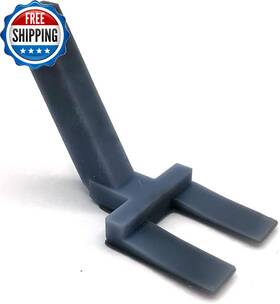
( Brand: Paper ), ( Manufacturer Part Number: AS-PTLEG-HP8000 ), ( Part Type: Kit Paper Tray ), ( Duplex: Simplex ), ( Control Method: Touch ), ( Ink Color: Cyan, Magenta, Yellow, Black ), ( Dual-sided Printing: No ), ( Controller Type: Push Button ), ( Max Input Sheet Capacity: 150 ), ( Printer Media Size Maximum: Super B/a3 ), ( Hardware Interface: Usb ), ( Package Dimensions: 3.11 X 1.57 X 1.54 Inches ), ( Additional Printer Functions: Print Only ), ( Model Series: Hp Officejet Pro 8000 Series ), ( Item Weight: 0.528 Ounces ), ( Specific Uses For Product: Home/office Document Printing ), ( Special Feature: Portable ), ( Printing Technology: Inkjet ), ( Color: Red ), ( Compatible Devices: Pc ), ( Printer Output: Color ), ( Included Components: Replacement Leg ), ( UPC: 711181135602 )
Review PAPER Technologies Repair Kit Hp Officejet Pro 8000 Series Tray Leg
The AS-PTLEG-HP8000 repair kit is a specifically designed solution for those experiencing issues with the paper tray leg 1KR57-90012 of their HP OfficeJet Pro 8000all-in-one printer. This replacement part is engineered to fit precisely into your machine, ensuring a seamless integration and reliable operation.
The paper tray leg is a critical component of the printer's design, responsible for providing support and stability to the paper tray. Over time, this component may succumb to wear and tear, causing the tray to sag or malfunction, resulting in paper feed issues or an inability to load paper properly.
With the AS-PTLEG-HP8000 repair kit, you can restore the functionality of your HP OfficeJet Pro 8000 printer. This robust and durable leg replacement is made from high-quality materials that are designed to withstand the rigors of daily usage in a home or office environment.
The installation process is straightforward and doesn't require any specialized tools or technical expertise. The kit comes with clear and easy-to-follow instructions to guide you through the replacement process. In no time, you'll have your HP OfficeJet Pro 8000 printer back up and running efficiently, with a stable and secure paper tray.
By investing in this repair kit, you're making a cost-effective decision for maintaining the performance and longevity of your printer. Replacing a single component rather than purchasing an entirely new printer can save you both money and resources.
This AS-PTLEG-HP8000 repair kit offers the perfect balance of affordability, functionality, and durability for your HP OfficeJet Pro 8000 printer. It's the answer to a reliable and hassle-free printing experience, allowing you to continue producing high-quality documents, photos, and other essential paperwork for your personal or professional needs.
Considerations Before Buying an Hp Officejet Pro 8000 Repair Kit for Paper Tray Leg 1Kr57-9012 (HP Part Number: as-ptleg-hp8000)
Introduction:The HP Officejet Pro 8000 is a popular all-in-one printer designed for small businesses and home offices. Over time, the paper tray legs can wear out, and you might need to replace them. Buying an as-ptleg-hp8000 repair kit is a cost-effective solution for this issue. However, this article will present both the advantages and disadvantages of purchasing this repair kit for your HP Officejet Pro 8000 to help you make an informed decision.
Pros:1. Cost-effective: Replacing the paper tray legs with a repair kit is significantly cheaper compared to buying a new printer. Buying a new printer involves a higher initial investment and additional costs for installation, toner, and other supplies.
2. Quick and Easy Installation: The repair kit's installation process is straightforward, usually taking less than ten minutes. Simply follow the instructions provided, attach the new leg, and your printer is good as new.
3. OEM Compatibility: A repair kit using the same part number (as-ptleg-hp8000) as the original equipment manufacturer (OEM) guarantees that the replacement parts are designed specifically for the HP Officejet Pro 8000, ensuring a perfect fit.
4. Improved Printer Longevity: Using a repair kit to fix issues, such as paper tray legs, can help extend the life of your printer, saving you the cost of buying a new one.
Cons:1. Limited Lifespan: While replacing the leg might extend the life of your printer, other parts may still wear out and require future repairs. This could mean you'll be repeatedly buying repair kits over time.
2. Availability: You may face difficulty in finding the exact repair kit, as some retailers may be out of stock or unaware of it. You will need to search online or contact HP's support for assistance.
3. Additional Costs for Shipping: In some cases, shipping costs for repair kits can be high, especially if they are not covered under a warranty or if they're coming from a seller with high shipping fees.
4. Potential Learning Curve for Installation: Though the installation process is relatively straightforward, some users might find it challenging, which could lead to errors and frustration. In such cases, contacting HP's support team or watching an installation video online can be helpful.
Conclusion:When deciding whether to buy an HP Officejet Pro 8000 repair kit for paper tray leg 1kr57-90012 (as-ptleg-hp8000), consider the costs, availability, and your level of technical expertise. While there are some downsides, such as limited longevity and potential learning curve for installation, the advantages, including cost-effectiveness and compatibility, can outweigh the disadvantages for many users. If you are willing to invest some effort into the repair process, the benefits can save you considerable time and money in the long run.
Recommendation:Prior to making a purchase, ensure you've verified the part number (as-ptleg-hp8000) is the correct one for your printer model and check the availability, shipping costs, and compatibility with your location. Additionally, review user manuals or installation videos to familiarize yourself with the process, and consider reaching out to HP's customer support if you have any questions or issues.
Details:
Snag the red replacement leg on and secure it with a piece of regular desk tape. Snag the red replacement leg on and secure with a piece of regular desk tape. You can re-secure it with another piece of tape. Fix the Close Tray, Paper tray is open problem after missing a leg on HP inkjet computer printer trays.
Package include: one replacement leg only. If you push too hard next time, the leg will fall off rather than broken like first time. The package includes one replacement leg only. Designed for HP OfficeJet Pro 8000 Series 8022 8025 8028 8035 all in one printer with Parts List Number: 1KR57-90012.
If you push too hard next time, the leg will fall off rather than break like first time. Fix Close Tray, the Paper tray is open problem after missing a leg on HP inkjet computer printer trays output delivery. The original Paper tray is not included.
part #: asptleghp8000 prices
- $24.97-$40.99
specifications feedertray:
- brand: Paper
- mpn: As-ptleg-hp8000
- part type: Kit Paper Tray
- duplex: Simplex
- control method: Touch
- ink color: Cyan, Magenta, Yellow, Black
- dual-sided printing: No
- controller type: Push Button
- max input sheet capacity: 150
- printer media size maximum: Super B/a3
- hardware interface: Usb
- package dimensions: 3.11 X 1.57 X 1.54 Inches
- additional printer functions: Print Only
- model series: Hp Officejet Pro 8000 Series
- item weight: 0.528 Ounces
- specific uses for product: Home/office Document Printing
- special feature: Portable
- printing technology: Inkjet
- color: Red
- compatible devices: Pc
- printer output: Color
- included components: Replacement Leg
- upc: 711181135602
general feedertray:
- condition: New
- Printers, Scanners Supplies > Printer Scanner Parts Accs > Feeders Trays
seller feedertray:
- city: Johnston, Rhode Island
- # reviews: 867
- rating: 100.0%
payments feedertray:
- wallet: Google-pay
- credit card: Diners-club
- other
offer feedertray:
- quantity: 1
- sold: 0
- options: Ship-to-home
- availability: In Stock
- started: January 8, 2025
returns feedertray:
- time: 30 Days
- policy: Returns Accepted
- paid by: Seller
- method: Money back
shipping feedertray:
- transit: 6-13 Days
- cost: $0.00
- carrier: USPS
- type: Fixed
- service: USPS Ground Advantage
- class: Standard
Paper AS-PTLEG-HP8000 Is Similar To:
- 0.7138548403851803 New Hp Laserjet Paper Feeder Tray For (32.3% similar) Condition: new other, in open box. If a power adapter is required for this item, it not included cord no other accessories hardware software. I'll get back to you as soon I can...(June 27th, 2018)
- 0012502623175 Paper Tray Brother Mfc495cw Inkjet (23.1% similar) I know nothing about it, except the printer does turn on, and screen tells me ink is out. Of course, I will leave the same for all good buyers. See the pictures. So, buy it, knowing this. Questions: I enjoy answering questions, so ask, prior to buying. Paper tray for brother MFC495CW inkjet all-in-...(January 12th, 2017)
- 0012502637905 Brother Int Supplies Lower Paper Tray Free Ship (27.5% similar) 48 brother int l supplies LT320CL LT-320CL. Upc 905 brand brother int l supplies model LT320CL condition new height 11. Please rest assured when purchasing from hippo-deals. Media types supported: A4BROTHER original supplies maintain top quality results offer great value for money. Type: multi-...(January 12th, 2019)
- 0012502646778 Brother Lower Paper Tray Sheet Capacity (30.3% similar) 500 sheet Paper capacity accepts different media sizes and print mixed sized documents for use with: HLL8360CDW, HLL8360CDWT, HLL9310CDW, MFCL8900CDW, MFCL9570CDW with an input capacity of sheets, the LT-340CL optional tray can help save time by supporting flexible options. Add the LT-340CL tray to ...(July 17th, 2018)
- 00ut750 0jx428 Dell Sheets Paper Tray Laser Printer (34.2% similar) Used but in great shape...(November 27th, 2018)
- 050e2380 Xerox Phaser Printer Sheet Paper Tray (35.9% similar) We pledge to deliver exactly what advertise in our ad, with straight forward honest and information. By utilizing this system we both can see all correspondence related to a specific item. We source items from multiple vendors and locations that are related to our core focus of technology. Please ...(May 27th, 2018)
- 050k 71212-6co Xerox Paper Tray (29.2% similar) Pulled from the new xerox versa link B405 printer with cracked body. Paper tray for xerox versa link B406 P/N: 050K 6CO condition: new...(December 22nd, 2017)
- 050k71211 050k71210 050k71212 Xerox Paper Tray Assy For Phaser Vesarlink (26.9% similar) Paper tray assort number: 050K71211, 050K71210, 050K71212FOR use in: xerox phase 3610, Vaseline B400 WC3615...(June 12th, 2019)
- 050k72191 Xerox New Work Centre Paper Tray Cassette (25.3% similar) New xerox work centre Paper tray, cassette 1-4 050K72191FOR use in the work centre 5325, 5330, 5335, 7120, 7125, 7220, 7225SHIPS fast...(October 4th, 2018)
- 0732a023 Canon Oem Paper Tray 013803108781 (27% similar) Orders usually ship the same day are placed or following...(June 24th, 2017)
- 081353148656 New Paper Feed Pickup Rollers For Canon Pixma (19.1% similar) 2 new Paper feed pickup rollers for canon pix ma MX922 printer: included...(July 16th, 2018)
