DELL K279H Drive Motor 5330DN
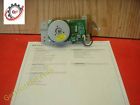
( Brand: Dell ), ( Manufacturer Part Number: K279H ), ( Part Type: Drive Motor )
Review DELL Complete Oem Developer Drive Motor Assembly Tested
The Dell Drive Motor K279H (part number 5330dn) is an essential component for ensuring the smooth operation of your Dell laser printer, specifically the Dell 5330dn model. This high-quality drive motor is designed to provide reliable and efficient power to the print mechanism, ensuring precise movement of the print head and delivering crisp, clear printouts.
The K279H drive motor is a robust and durable component, manufactured to withstand the rigors of continuous use in a high-volume printing environment. It features a powerful DC motor that delivers the necessary torque to move the print head, ensuring consistent and accurate placement of ink or toner on the paper.
The motor is designed with a focus on energy efficiency, minimizing power consumption and helping to reduce the overall cost of operation for your printer. It is also built to operate quietly, making it suitable for use in office environments where noise levels need to be kept to a minimum.
The Dell Drive Motor K279H is easy to install, with a straightforward plug-and-play design that requires no additional tools or technical expertise. It is compatible with the Dell 5330dn printer and is a direct replacement for the original motor, ensuring a seamless installation process.
In conclusion, the Dell Drive Motor K279H (part number 5330dn) is an essential component for maintaining the optimal performance of your Dell 5330dn laser printer. Its powerful, energy-efficient design, quiet operation, and easy installation make it an ideal choice for office environments where reliability and efficiency are key.
Product: Dell Drive Motor K279H (5330DN)
Pros:1. Compatibility: This Dell Drive Motor is specifically designed for Dell 5330DN printers, ensuring a seamless fit and function.
2. Durability: Dell is known for manufacturing high-quality products, and this motor is expected to be robust and reliable.
3. Availability: Replacing a worn-out motor with a new one can save you the cost of buying a new printer.
4. Easy Installation: With clear instructions and easy-to-follow steps, you should be able to replace the motor yourself, saving on repair costs.
Cons:1. Cost: Replacing a printer part can be expensive, especially if you're not covered by a warranty.
2. Potential for Damage: If not handled correctly during installation, you might inadvertently damage other parts of your printer.
3. DIY Skills Required: While Dell provides installation instructions, you might need some technical skills to replace the motor and avoid further damage.
Conclusion:If you're comfortable with DIY repairs and can afford the cost, replacing the Dell Drive Motor K279H for your 5330DN printer could save you money in the long run. However, consider the potential consequences of damaging other parts or having to pay for professional repair services. If you're unsure about your abilities, it might be better to seek professional help.
Recommendation:Before attempting the repair, make sure you have the necessary skills and tools. Research the procedure thoroughly to understand any potential complications. If you're not confident, consider hiring a professional to avoid further damage and expense.
Details:
Thanks shipping options: domestic shipping: weight based charges.
Get business information that counts.
Used pull, inspected thoroughly.
Only what is shown included.
Used pull, inspected thoroughly.
part #: k279h prices
- $13.29-$16.99
specifications feedertray:
- brand: Dell
- mpn: K279h
- part type: Drive Motor
Payments feedertray:
- PayPal
- AmEx
- Discover
- VisaMC
Offer feedertray:
- bids: 0
- best offer: false
- Sold: 0
- Started: November 24, 2018, 2:22 am
- quantity: 1
Ratings:
- Product as described. well packaged. fast delivery. good transaction 11-14-18
- good 11-04-18
- Fast ship, item installed and functioning as intended, thanks again, A 11-19-18
- received as promised as described great 11-13-18
Shipping feedertray:
- type: Calculated
- handling: 3 days
Returns feedertray:
- paid by: Buyer
- time: 30 Days
- policy: returns accepted
- type: Money back or replacement buyers choice
Seller feedertray:
- # feedbacks 11-24-18: 10327
- zipcode: 21158
- rating 11-24-18: 100.0%
- city: Westminster, Maryland
General feedertray:
- condition: Seller refurbished
- in stock: Yes
- Printer Scanner Parts Accs > Feeders Trays
Dell K279H Is Similar To:
- 0p366c Cn-0p366c Dell Printer Complete Adf Assembly With Cable Black 786301672626 (38% similar) Gets you noticed...(April 6th, 2018)
- 0r511d Dell Oem Paper Tray Duplex For (36.7% similar) The stacking housing has a few scuffs and scratches from storage. Shipping weight 10 lbs. Includes the stacking housing with connector and paper tray. The scuffs and scratches do not affect functionality of item...(September 10th, 2018)
- 0rc538 Cn-0rc538 Dell Laser Printer Paper Exit Guide Assembly 786301698084 (38.5% similar) ...(March 19th, 2018)
- 0ut750 Dell Oem Drawer (33.7% similar) ...(December 29th, 2018)
- 0x920d Cn-0x920d 330-1434 X920d P238d C660d Dell Printer Optional Feeder Tray Assembly 724172853034 (30% similar) ...(June 1st, 2018)
- 127k58891 Dell Sheet Option Feeder Main Motor Drive Gear Assy (47.5% similar) Thanks shipping options: domestic shipping: weight based charges. Used pull, inspected thoroughly. Get business information that counts. This motor and drive can only be used for optional D342T 550 sheet feeder it does not fit Dell 5130C base machine. Only what is shown included...(May 9th, 2018)
- 3000cn Dell Mpp Feeder Assembly (37% similar) Be certain this part is the correct one for your model. This part may or not be the cause. Please review all pictures before deciding to purchase. Prior to disassembly, the printer had a printing issue see images of print-outs that we did not have time repair. Item is used, and was pulled from a ...(October 20th, 2017)
- 40x5852 Lexmark Miprinter Charge Roll Assembly Kit For Dell Series (39.4% similar) If you want a reliable laser printer and don't to spend the big on new business-class hp laser jet look at refurbished. We change all new rollers, pads, check and rebuild the fusee many companies don't, perform other tasks to printers, make sure they can last until next due maintenance date. ...(September 30th, 2018)
- 525w Dell Small Front Paper Output Tray Printer Part Genuine Oem (24% similar) This is the small tray that catches paper when it comes out of front printer. We like to think that are easy people work with and want you get a good value from our listings...(June 27th, 2018)
- 54-05156-00a Dell Printer Lower Paper Tray Assembly 706695167737 (40% similar) ...(April 20th, 2018)
- 591-bbco Dell New Oem Sheet Optional Tray (39.2% similar) New oem Dell S5840 550 sheet optional tray 591-BBCO, 349FH, C4F25 in box - S2825 1 per part numbers: works in: highlights offers paper holding capacity of up to sheets expands your paper-handling options. The optional 550-SHEET paper tray increases total input capacity to 2300 sheets via 3x 550 ...(January 4th, 2019)
