EPSON WF-7610 Control Panel
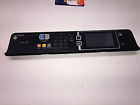
( Brand: Epson ), ( Model: WF-7610 ), ( Series: Printer ), ( Type: Adf Feeder/ Tray )
Review EPSON Main Control Panel
The Epson WF-7610 Control Panel is a highly intuitive and user-friendly interface designed to provide effortless operation of your Epson WF-7610 Wireless Color Inkjet All-in-One Printer. This control panel features a large, 4.3-inch LCD touch screen that offers vivid, high-resolution visuals, ensuring a clear and straightforward interaction with your device.
The control panel is equipped with a variety of easy-to-use buttons, each with a distinct function, providing quick access to essential features such as print, copy, scan, and fax. The touch screen allows you to navigate through menus with ease, making it simple to adjust settings like print quality, paper size, and color mode.
The control panel is also home to a built-in SD card slot, enabling you to directly print photos and documents from your SD card without the need for a computer. Additionally, it includes a USB direct print function, which allows for quick and straightforward printing from USB devices.
The Epson WF-7610 Control Panel is designed for optimal user experience, with its clean layout and simple navigation. It is also energy-efficient, automatically turning off when not in use to conserve power and reduce environmental impact.
In summary, the Epson WF-7610 Control Panel is a versatile and user-friendly tool that ensures seamless operation of your WF-7610 printer, providing you with the convenience of direct printing and easy-to-use settings for a hassle-free experience.
Pros of buying Epson WF-7610 Control Panel:1. Customizable: The control panel allows for personalized settings, making it easier to adjust settings according to your printing needs.
2. Convenient: The control panel has a large, easy-to-read display that shows information such as ink levels and print settings, making it simple to use.
3. Reduces Wastage: The control panel reduces the need for manual intervention, which can help save ink and paper by ensuring that only necessary prints are made.
Cons of buying Epson WF-7610 Control Panel:1. Additional Cost: The control panel is an additional cost, which may not be necessary for some users, as the printer can be controlled through a computer.
2. Limited Functionality: Compared to a full computer system, the control panel has limited functionality. It may not be able to perform complex tasks such as editing documents or designing graphics.
Conclusion:The Epson WF-7610 Control Panel is a useful addition to the WF-7610 printer, providing a convenient and customizable way to control printing. However, it is an additional cost and may not be necessary for all users. If you frequently print documents and graphics and want a more hands-on approach to printing, the control panel is a worthwhile investment. If you primarily print occasional documents and prefer to control printing through a computer, you may be better off without the control panel.
Recommendation:If you frequently print documents and graphics and want a more hands-on approach to printing, I recommend investing in the Epson WF-7610 Control Panel. It will provide a more convenient and customizable way to control your printing, saving you time and ink. However, if you primarily print occasional documents and prefer to control printing through a computer, you may be better off without the control panel.
Details:
Fully tested after removal from a nonworking machine. Control panel for the Epson WF-7610 printer comes as pictured. Fully guaranteed.
part #: wf7610 prices
- $28.99-$160.00
specifications feedertray:
- brand: Epson
- model: Wf-7610
- series: Printer
- type: Adf Feeder/ Tray
Payments feedertray:
- PayPal
Shipping feedertray:
- handling: 3 days
- cost: $0.0
- type: Flat
Offer feedertray:
- Sold: 0
- Started: July 22, 2017, 11:14 am
- quantity: 1
- bids: 0
- best offer: true
Ratings:
- Fast delivery. product just as described! Thanks! 07-21-17
- A Seller just as described ! Packaging was great! No damages!!!! 07-21-17
- Good buyer, prompt payment, valued customer, highly recommended. 07-17-17
- Lightning shipping. Printer works perfectly. Exactly as described. A 07-20-17
- A total mess. Ink all over the machine. Not sure if I can get it to work once 07-21-17
Seller feedertray:
- city: Ventnor City, New Jersey
- zipcode: 08406
General feedertray:
- condition: Used
- computers tablet's networking > printers scanners supplies parts accessories computers > feederstrays printers scanners computers
- in stock: Yes
Returns feedertray:
- policy: no returns
Epson WF-7610 Is Similar To:
- 2111527 Epson Control Board For Adf Pn (51.4% similar) ...(March 30th, 2018)
- 275011 Epson Workforce Main Paper Loading Cassette Tray 796930228323 (34% similar) Paper tray is in very good working and cosmetic condition. G124 this is an original Epson paper cassette tray for workforce WF-2750, WF-2760, WF-2650, WF-2660 printers. It was removed from a new printer and packaged well...(April 13th, 2018)
- 3270840 Epson Workforce Main Paper Loading Tray 734463764246 (37% similar) Paper tray is in very good working and cosmetic condition. It was removed from a gently used printer and packaged well. G139 this is an original Epson main paper cassette tray for workforce WF-7610 printers...(September 18th, 2018)
- 6545974 Epson Printer Main Paper Tray Cassette 707568964378 (35.2% similar) Paper tray is in very good working and cosmetic condition. G137 this is an original Epson main paper cassette tray for expression XP-520 printers...(September 10th, 2018)
- Xp-620 Epson Main Paper Tray For Xp-600 Xp-610 Xp-800 Xp-810 Xp-820 (36.4% similar) Pulled from Epson PX 820 Epson main paper tray for PX 6 PX 610, PX 620, PX 8 PX 810, PX 820 free shipping...(December 9th, 2016)
- Wf-3620tray1 Epson Workforce Main Paper Loading Tray Upper 796930228699 (38.8% similar) Paper tray is in very good working and cosmetic condition. It replaces tray 1 which is the upper. Tray is also going to work on WF-3640, WF-3530, WF-3540 printers. G126 this is an original Epson main paper cassette tray for workforce WF-3620 and WF-3520 printers. It was removed from a gently used ...(April 20th, 2018)
- Wf2540rit Epson Workforce Rear Main Paper Load Tray Feeder 796930228590 (35% similar) Please feel free to ask me questions. G124THIS is an Epson workforce WF-2540 and WF-2530 printer rear main paper input tray original part. In very good condition...(April 18th, 2018)
- Wf2630rit Epson Workforce Rear Main Paper Load Tray Feeder 796930228576 (36.9% similar) Please feel free to ask me questions. G125THIS is an Epson workforce WF-2630 printer rear main paper input tray original part. In very good condition...(April 17th, 2018)
- Dspnnw1 Epson Networks Interface Panel From Japan (44.4% similar) Japanese menu only: Panasonic camera English available Nikon, canon warranty. Electronics japan usage item. Does not accept lithium battery via ems, Sal by post office. So items have only Japanese manual menu language. Buyers need to send item us in japan repair with warranty own all shipping cost. ...(February 6th, 2021)
- Epson Epxp236304 Expression Xp-630 Xp-640 Printer Main Paper Cassette Tray (26.4% similar) Epson expression XP-630 XP-640 printer main paper cassette tray...(September 26th, 2023)
- Epson 796930235338 Expression Xp-820 Xp-830 Printer Main Paper Tray Cassette (25.9% similar) Epson expression printer main paper tray cassette for model's: XP-820, XP-830, genuine part. Pulled from a lightly used printer and working perfectly. As with all our listings, only what is pictured included...(July 30th, 2024)
